¶ Nexio nexMEM for NIDEK RT-6100 - Instructions for Use
Document ID: NEXIO-NEXMEM-RT6100-IFU-EN
Version: 1.2.2
Date: 2026-08-07
Applies to: Nexio nexMEM connected to a NIDEK RT-6100 and PC acquisition software in RT-5100 mode
¶ Preface
Thank you for choosing a Nexio device. The nexMEM is manufactured by NEXIO Sarl and is intended to provide a simple data connection between supported ophthalmic instruments and acquisition systems.
This IFU describes the safe handling, installation, RT-6100 configuration, routine operation, maintenance, regulatory information, and disposal of the Nexio nexMEM for NIDEK RT-6100.
For this application, the user workflow is:
- Connect the RT-6100 to the nexMEM with a LAN cable.
- Configure the RT-6100 as shown in this document.
- Connect the nexMEM DB9 serial port to the acquisition PC with an RS-232 null modem cable.
- Configure the acquisition software in NIDEK RT-5100 mode.
No network configuration is required on the acquisition PC.
WARNING!
Read this IFU before installing or using the product. Failure to follow the instructions and safety notes may result in injury, product damage, data transfer errors, or loss of warranty coverage.
NOTE!
The RT-6100 screenshots in this document may appear in another language depending on the device configuration. Use the field positions and values as the reference.
¶ 1. Safety
¶ 1.1 Residual Risks
Residual risks remain even when the nexMEM is used as intended. Hazards may occur if the product is installed, connected, cleaned, or used outside the limits described in this IFU.
WARNING!
Do not modify the device without written authorization from NEXIO Sarl.
WARNING!
Installation and servicing must be performed by trained personnel or an authorized distributor.
WARNING!
Use the device indoors only. Keep the ventilation area clear and do not install the unit in a closed cabinet without airflow.
WARNING!
Keep the device and cables away from strong RF emitters, ESD sources, and power cables. Ensure strain relief on connected cables.
WARNING!
Use only a certified USB-C power supply rated 5 V / 3 A or higher and compliant with applicable standards. The power connector must remain accessible for disconnection.
NOTE!
Use approved accessories and suitable cables only.
NOTE!
The nexMEM itself is not a medical device. It is connected to ophthalmic devices only to convert, route, and exchange data.
¶ 2. Intended Use
The Nexio nexMEM is intended to transfer refraction data from and to a NIDEK RT-6100 using acquisition software configured for NIDEK RT-5100 communication.
¶ 2.1 Supported Functions
For this RT-6100 application, the nexMEM supports:
- bidirectional data exchange between the NIDEK RT-6100 and PC acquisition software;
- transfer of LM and AR data from the PC acquisition software to the RT-6100;
- transfer of final RT-6100 refraction output back to the PC acquisition software;
- RS-232 communication with acquisition software configured in NIDEK RT-5100 mode.
¶ 2.2 Typical Applications
Typical use is the connection of a NIDEK RT-6100 to acquisition software that expects NIDEK RT-5100 serial communication. The nexMEM allows the RT-6100 to be integrated into an existing RT-5100-compatible workflow without requiring PC-side network configuration.
¶ 2.3 Intended Users
- Daily operation: ophthalmologists, optometrists, orthoptists, and trained clinical staff.
- Installation and configuration: Nexio trained technicians or authorized distributors.
¶ 2.4 Limitations
- The nexMEM is not intended for direct patient diagnosis, therapy, or life-support applications.
- The nexMEM must only be used with compatible and validated equipment.
- The nexMEM must not be operated near high-frequency surgical equipment, inside RF-shielded MRI rooms, or in other environments with strong electromagnetic disturbances.
¶ 3. Device Overview
¶ 3.1 Composition
The nexMEM is supplied as a complete converter unit with enclosure, status indicators, Ethernet connectivity, USB-C power input, and RS-232 connectivity.
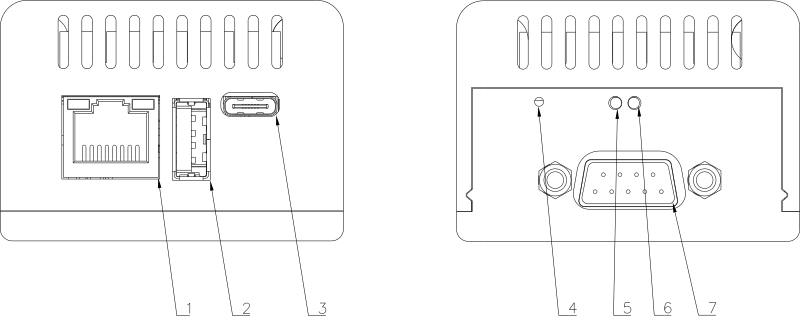
¶ 3.2 Connectors
- ① Ethernet (RJ-45, 10/100/1000)
- ② USB-A (host)
- ③ USB-C (power input, min. 5 V / 3 A certified PSU required)
- ④ Reset button (technician-only; do not press unless instructed by service)
- ⑦ RS-232 (DB9 male, connect the RS-232 cable supplied with the medical device to be interfaced)
Note: ⑤ and ⑥ are the LED indicators (see §3.3).
¶ 3.3 Indicators (LEDs)
-
⑤ Red LED (left):
- On → device is powered.
- Off → no power, check the USB-C 5 V supply.
-
⑥ Green LED (right):
- Off → system not operational, contact your distributor.
- Blinking (heartbeat) → system is running normally.
¶ 3.4 What's in the Box
- Nexio nexMEM unit.
- 4 self-adhesive rubber feet.
- Technician access labels, if provided with the unit.
NOTE!
The power supply may be supplied separately. Use a certified 5 V / 3 A USB-C adapter provided by your distributor or local supplier.
¶ 3.5 Accessories and Optional Components
- RS-232 null modem cable for the acquisition PC.
- USB-to-RS-232 adapter if the PC has no native DB9 serial port.
- LAN cable for the RT-6100 relay box.
- Mounting accessories, if supplied by the distributor.
¶ 4. Transport, Storage, and Ambient Conditions
| Parameter | Value |
|---|---|
| Transport temperature | -20 deg C to +70 deg C |
| Storage temperature | -10 deg C to +55 deg C |
| Operating temperature | +10 deg C to +35 deg C |
| Relative humidity | 30% to 90%, non-condensing |
| Ingress protection | IPX0, indoor use only |
¶ 4.1 Transport Instructions
- Ship the unit in the original packaging or equivalent protective packaging.
- Protect the product from shock, vibration, moisture, and liquid ingress.
- Do not place heavy items on top of the unit during transport.
- After unpacking, visually inspect the unit for damage before commissioning.
NOTE!
After transport or storage, allow the unit to reach room temperature before powering it on. This reduces the risk of condensation.
¶ 5. Installation / Assembly
Installation and initial configuration must be performed by a Nexio trained technician or an authorized distributor. End users must not open or modify the unit.
¶ 5.1 General Installation Guidelines
- Place the nexMEM on a stable, flat surface with free airflow on all sides.
- Keep at least 20 mm clearance around the unit when installed on a shelf, bracket, or inside furniture.
- Route cables safely so they cannot be pulled, bent sharply, pinched, or tripped over.
- Keep signal cables away from power cables and strong RF sources.
- Before handling connectors, discharge static electricity by touching a grounded metal surface.
¶ 5.2 Connect the RT-6100
- Connect one end of the LAN cable to the RT-6100 relay box RJ45/LAN connector.
- Connect the other end to the RJ45/LAN connector of the nexMEM.
- Make sure the LAN cable is firmly inserted on both sides.
¶ 5.3 Connect the Acquisition PC
- Connect the RS-232 null modem cable to the DB9 port of the nexMEM.
- Connect the other end to the PC serial port or USB-to-RS-232 adapter.
- In the acquisition software, select the serial port assigned to this cable.
- Set the acquisition software communication mode to
NIDEK RT-5100orRT5100. - Use the RS-232 profile selected on the nexMEM. The factory default is RT-5100 Type 1:
2400baud,7data bits,evenparity,2stop bits.
No other PC-side network configuration is required.
¶ 5.4 Power Connection
- Connect the certified USB-C 5 V / 3 A power supply to the nexMEM.
- Route the power cable so the connector remains accessible.
- Do not power on the system until all required cables are connected.
NOTE!
Use shielded RS-232 cables where possible. If EMC issues are observed on long cables, contact Nexio Sarl or the authorized distributor.
¶ 6. Commissioning
¶ 6.1 Power On
Connect the USB-C power adapter. The nexMEM starts automatically. No additional action is required for normal operation after the RT-6100 and acquisition software have been configured.
¶ 6.2 Power Off
Disconnect the USB-C power connector to remove power completely.
NOTE!
Use only an external power supply compliant with IEC/EN 62368-1, rated at least 5 V / 3 A, and certified for the region of use.
NOTE!
Always make sure the power connector remains easily accessible for disconnection.
¶ 7. nexMEM Operation and RT-6100 Configuration
¶ 7.1 RT-6100 Configuration
Configure the RT-6100 exactly as shown below.
¶ 7.1.1 Open the RT-6100 Settings
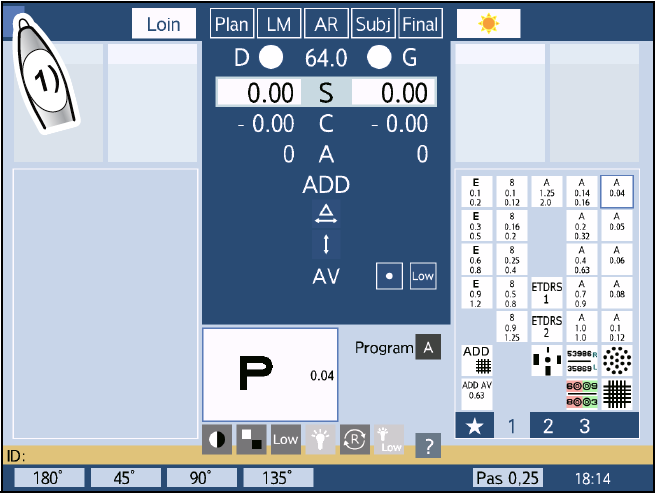
Display the RT-6100 menu screen, then press the side menu button.
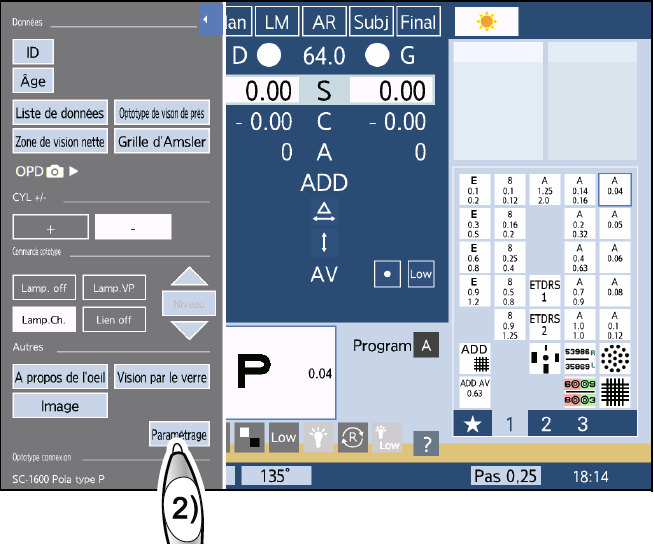
When the side menu is displayed, press Settings.
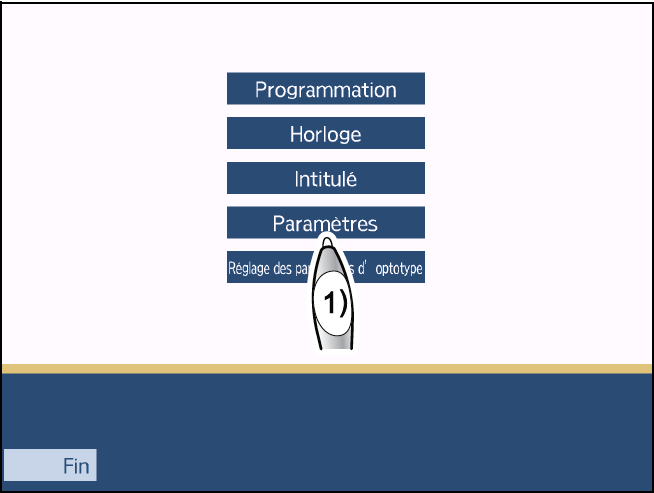
In the settings menu, press Parameters.
Open the network settings screen, then select Other.
¶ 7.1.2 Network Settings
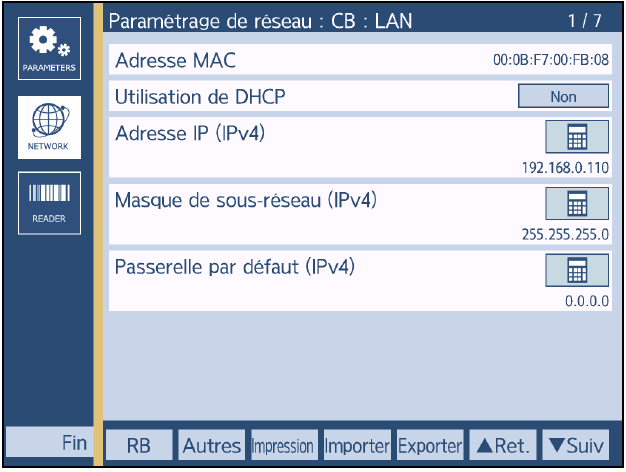
On the CB LAN network screen, use these values:
| Setting | Value |
|---|---|
| Use of DHCP | No |
| IP address (IPv4) | 192.168.0.110 |
| Subnet mask (IPv4) | 255.255.255.0 |
| Default gateway (IPv4) | 0.0.0.0 |
The nexMEM destination address used in the RT-6100 screens below is:
192.168.0.115
NOTE!
The nexMEM uses a fixed IP address. If the installation requires a different IP address or network plan, contact Nexio Sarl.
¶ 7.1.3 Shared Folder Screen 1/4
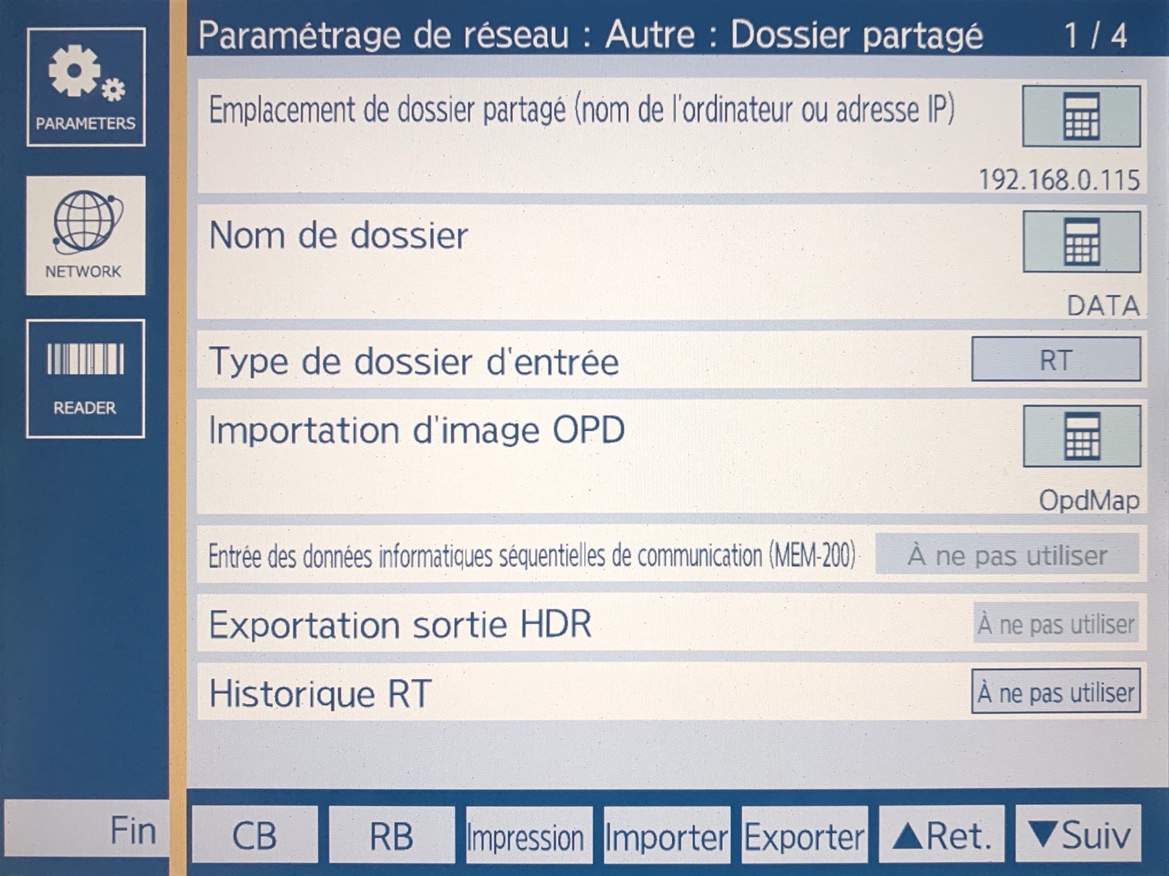
Enter these values:
| Field | Value |
|---|---|
| Shared folder location, computer name or IP address | 192.168.0.115 |
| Folder name | DATA |
| Input folder type | RT |
| OPD image import | OpdMap |
| Sequential communication computer data input (MEM-200) | Do not use |
| HDR output export | Do not use |
| RT history | Do not use |
¶ 7.1.4 Shared Folder Screen 2/4
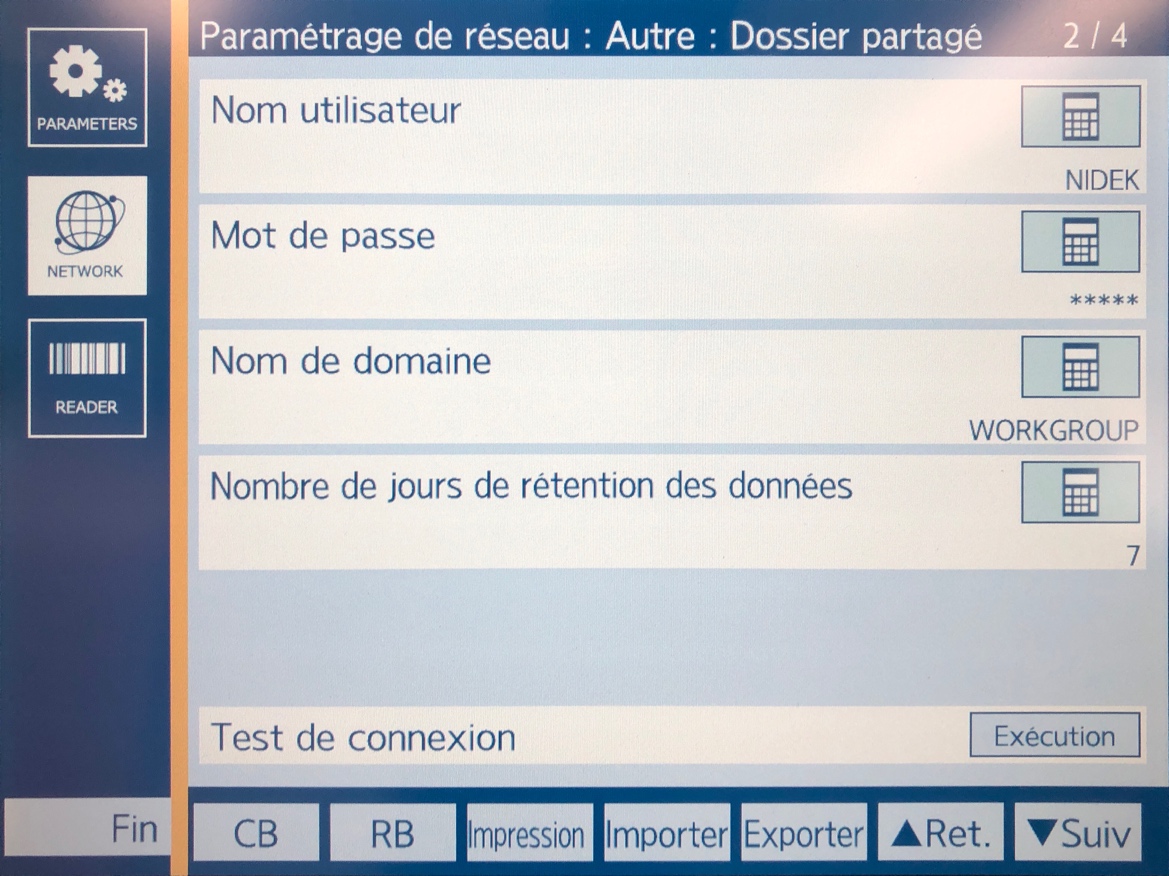
Enter these values:
| Field | Value |
|---|---|
| User name | NIDEK |
| Password | RT015 |
| Domain name | WORKGROUP |
| Data retention days | 7 |
Run the connection test with Execution. At this stage, the test may fail until the RT-6100 has been fully restarted after configuration.
¶ 7.1.5 External Output Screen 3/4
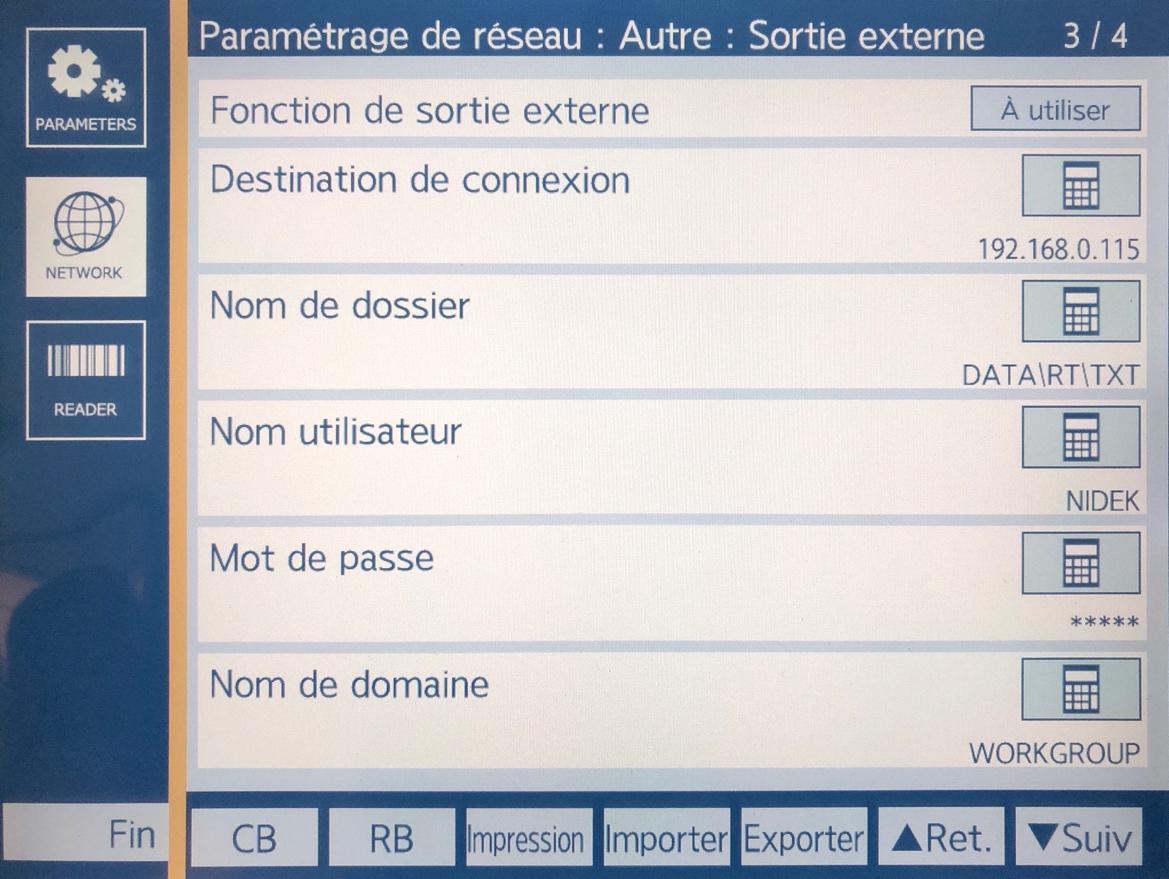
Enter these values:
| Field | Value |
|---|---|
| External output function | Use |
| Connection destination | 192.168.0.115 |
| Folder name | DATA\RT\TXT |
| User name | NIDEK |
| Password | RT015 |
| Domain name | WORKGROUP |
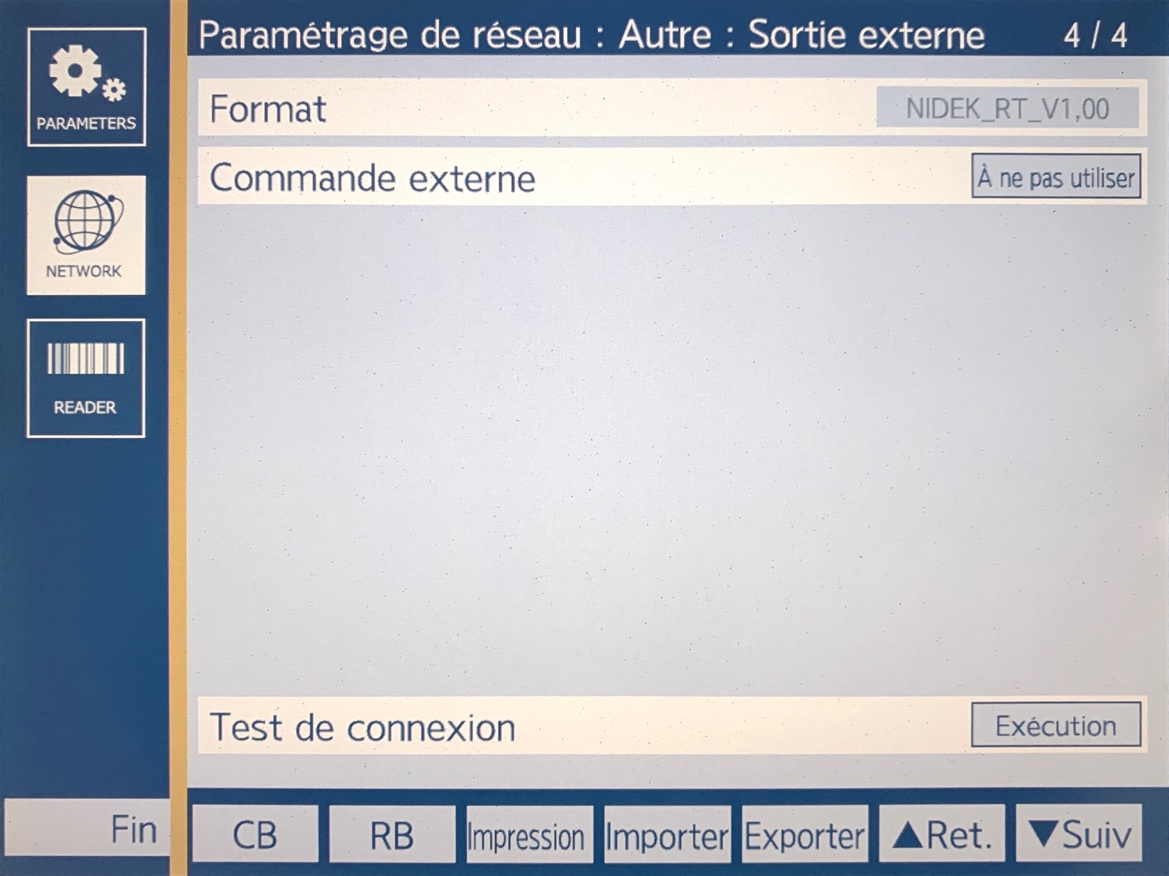
¶ 7.1.6 External Output Screen 4/4
Enter these values:
| Field | Value |
|---|---|
| Format | NIDEK_RT_V1,00 |
| External command | Do not use |
Run the connection test with Execution. At this stage, the test may fail until the RT-6100 has been fully restarted after configuration.
¶ 7.1.7 Finish the RT-6100 Setup
- Save the RT-6100 settings.
- Exit the settings menu and return to the main RT-6100 screen.
- Completely restart the RT-6100.
- After the restart, return to the same network settings menu.
- Run the connection tests again with
Execution. - Confirm that the connection tests now succeed.
- Perform a test measurement.
- Confirm that the acquisition software receives the result in RT-5100 mode.
¶ 7.2 Acquisition Software Setup
On the PC acquisition software:
- Select the serial port connected to the nexMEM.
- Select the device or protocol mode
NIDEK RT-5100orRT5100. - Select the serial communication parameters matching the nexMEM RS-232 profile.
- Save the software settings.
- Run a test acquisition from the RT-6100.
No other PC-side network configuration is required.
¶ 7.3 Routine Operation
During normal operation:
- The user can send LM and AR data from the PC acquisition software to the RT-6100 through the nexMEM.
- The user performs the refraction on the RT-6100.
- When the refraction is complete, the user sends the output from the RT-6100.
- The refraction result is transmitted back to the PC acquisition software through the nexMEM.
If no result is received, check the LAN cable, the RS-232 null modem cable, the selected PC serial port, and the RT-6100 connection tests.
¶ 8. RS-232 Communication and XML Output Configuration
The nexMEM emulates a NIDEK RT-5100 serial interface. The communication profile and XML output metadata are configured in the same file on the nexMEM Samba share. No SSH or technician login is required.
¶ 8.1 RS-232 Profile Selection
Two RT-5100 RS-232 profiles are supported:
| nexMEM profile | RT-5100 profile | Baud rate | Data bits | Parity | Stop bits |
|---|---|---|---|---|---|
type1 |
Type 1 | 2400 |
7 |
even |
2 |
type2 |
Type 2 | 9600 |
8 |
odd |
1 |
The factory default is type1. Use this profile unless the acquisition software is specifically configured for RT-5100 Type 2. The serial settings in the acquisition software must always match the selected nexMEM profile.
¶ 8.2 Open the Configuration File
-
From the acquisition PC or service PC, open the nexMEM Samba share:
\\192.168.0.115\DATAIf the site uses the DHCP address or host name, use the address or name provided by the distributor.
-
Open the
CONFIGfolder. -
Open the
serial-profile.txtfile with a plain-text editor. -
Edit only the values after the
=signs. Lines beginning with#are comments and may be left unchanged. -
Save the file as plain text with the same file name.
¶ 8.3 Configuration File Reference
The factory configuration is:
# Accepted profile values: type1, type2
profile = type1
# Accepted value: any non-empty text
rktModelName = nexMem
# Accepted value: any non-empty text
lmModelName = nexMem
# Accepted patientCounterMode values: persistent, daily, boot
patientCounterMode = persistent
# Accepted value: any positive integer (1 or greater)
patientCounterStart = 1
# Accepted xmlHistoryMode values: overwrite, keep
xmlHistoryMode = overwrite
# IANA time zone; daylight saving time is automatic
timeZone = Europe/Zurich
| Setting | Accepted value | Factory default | Function |
|---|---|---|---|
profile |
type1 or type2 |
type1 |
Selects the RT-5100 RS-232 communication parameters |
rktModelName |
Any non-empty text | nexMem |
Sets <ModelName> in ARK/RKT XML files |
lmModelName |
Any non-empty text | nexMem |
Sets <ModelName> in LM XML files |
patientCounterMode |
persistent, daily, or boot |
persistent |
Selects when the nexMEM patient number resets |
patientCounterStart |
Positive integer, 1 or greater |
1 |
Sets the first number used for a new or reset counter |
xmlHistoryMode |
overwrite or keep |
overwrite |
Selects whether previous XML files are replaced or retained until the next service start |
timeZone |
IANA geographical name | Europe/Zurich |
Sets Linux local time display and applies daylight saving time automatically |
Legacy files containing only type1 or type2 remain supported. The key/value format above is recommended for all new installations.
If a value is invalid, nexMEM records a warning and uses the safe default or configured fallback for that setting. Unknown setting names are ignored and recorded as warnings.
¶ 8.4 XML Model Names
rktModelName sets the value of <ModelName> in ARK/RKT output files. lmModelName sets the value independently in LM output files. Both values default to nexMem and may contain any non-empty text required by the receiving software.
Example:
rktModelName = Tonoref-III
lmModelName = LM-1800
¶ 8.5 Patient Number and Patient ID
The two XML patient fields have different sources and must not be confused:
| XML field | Source | Behaviour |
|---|---|---|
<Patient><No.> |
nexMEM counter | Always contains the sequential number generated according to patientCounterMode |
<Patient><ID> |
RT-5100 frame | Contains the numeric, non-zero patient ID received in the RT-5100 header; remains empty if no usable ID is received |
nexMEM does not copy its generated counter into <ID>. An RT-5100 patient ID containing only zeros is treated as absent.
¶ 8.6 Patient Counter Modes
| Mode | Reset behaviour |
|---|---|
persistent |
Never resets automatically; continues after a service restart or nexMEM power cycle |
daily |
Resets to patientCounterStart when the valid measurement date received from the RT-5100 changes |
boot |
Resets to patientCounterStart each time the nexMEM service starts, including a service restart without a power cycle |
The factory default is persistent. The persistent and daily state is stored in DATA\CONFIG\patient-counter.json.
NOTE!
Do not edit or deletepatient-counter.jsonduring normal operation. Deleting it resets a persistent or daily counter topatientCounterStarton the next measurement.
Changing patientCounterStart does not overwrite an existing persistent counter. The new start value is used when no counter state exists or when the selected mode requires a reset.
¶ 8.7 XML File History
xmlHistoryMode = overwrite keeps the historical nexMEM behaviour. Before writing a new ARK/RKT XML file, nexMEM removes the previous .xml files from RKT\TXT. Before writing a new LM XML file, it removes the previous .xml files from LM\TXT. Normally, one current RKT XML and one current LM XML remain.
xmlHistoryMode = keep preserves the previous XML files and adds each new result with its timestamped file name. If two results receive the same base file name, nexMEM adds a numeric suffix instead of overwriting the first file.
NOTE!
XML history is retained only until the nexMEM service starts again. At every service start, the production configuration empties the completeRT\TXT,RKT\TXT, andLM\TXTdirectories. This startup protection is not controlled byserial-profile.txtand prevents long-term storage growth.
¶ 8.8 Measurement Date and Time
The RT-5100 header provides the measurement date, which nexMEM writes to the XML output. The RT-5100 communication frame does not provide the measurement time.
nexMEM uses its local time only when its local date matches the measurement date received from the RT-5100. If the dates do not match, or if no valid measurement date is received, the XML time is written as 00:00:00. This avoids recording a misleading time after a power interruption when no reliable time source is available.
Set timeZone to an IANA geographical name such as Europe/Zurich, Europe/Paris, or America/Montreal. Do not use a fixed offset such as UTC+1, because it cannot follow daylight saving time. The DS3231 RTC and the Linux system clock remain in UTC. The selected zone only controls conversion to local time. If the setting is absent, the existing Linux time zone is retained.
The following canonical identifiers come from zone1970.tab in the nexMEM v1.2.2 image (tzdata 2026a). UTC offset (STD) is the standard-time offset; when a zone observes daylight saving time, Linux applies the seasonal offset automatically. The list installed on the box is authoritative. TimeAPI provides a searchable reference including historical aliases, while IANA maintains the time zone database and daylight-saving rules.
View 312 canonical IANA time zones
| IANA Time Zone | UTC offset (STD) | IANA Time Zone | UTC offset (STD) |
|---|---|---|---|
Africa/Abidjan |
+00:00 |
Asia/Baku |
+04:00 |
Africa/Algiers |
+01:00 |
Asia/Bangkok |
+07:00 |
Africa/Bissau |
+00:00 |
Asia/Barnaul |
+07:00 |
Africa/Cairo |
+02:00 |
Asia/Beirut |
+02:00 |
Africa/Casablanca |
+01:00 |
Asia/Bishkek |
+06:00 |
Africa/Ceuta |
+01:00 |
Asia/Chita |
+09:00 |
Africa/El_Aaiun |
+01:00 |
Asia/Colombo |
+05:30 |
Africa/Johannesburg |
+02:00 |
Asia/Damascus |
+03:00 |
Africa/Juba |
+02:00 |
Asia/Dhaka |
+06:00 |
Africa/Khartoum |
+02:00 |
Asia/Dili |
+09:00 |
Africa/Lagos |
+01:00 |
Asia/Dubai |
+04:00 |
Africa/Maputo |
+02:00 |
Asia/Dushanbe |
+05:00 |
Africa/Monrovia |
+00:00 |
Asia/Famagusta |
+02:00 |
Africa/Nairobi |
+03:00 |
Asia/Gaza |
+02:00 |
Africa/Ndjamena |
+01:00 |
Asia/Hebron |
+02:00 |
Africa/Sao_Tome |
+00:00 |
Asia/Ho_Chi_Minh |
+07:00 |
Africa/Tripoli |
+02:00 |
Asia/Hong_Kong |
+08:00 |
Africa/Tunis |
+01:00 |
Asia/Hovd |
+07:00 |
Africa/Windhoek |
+02:00 |
Asia/Irkutsk |
+08:00 |
America/Adak |
-10:00 |
Asia/Jakarta |
+07:00 |
America/Anchorage |
-09:00 |
Asia/Jayapura |
+09:00 |
America/Araguaina |
-03:00 |
Asia/Jerusalem |
+02:00 |
America/Argentina/Buenos_Aires |
-03:00 |
Asia/Kabul |
+04:30 |
America/Argentina/Catamarca |
-03:00 |
Asia/Kamchatka |
+12:00 |
America/Argentina/Cordoba |
-03:00 |
Asia/Karachi |
+05:00 |
America/Argentina/Jujuy |
-03:00 |
Asia/Kathmandu |
+05:45 |
America/Argentina/La_Rioja |
-03:00 |
Asia/Khandyga |
+09:00 |
America/Argentina/Mendoza |
-03:00 |
Asia/Kolkata |
+05:30 |
America/Argentina/Rio_Gallegos |
-03:00 |
Asia/Krasnoyarsk |
+07:00 |
America/Argentina/Salta |
-03:00 |
Asia/Kuching |
+08:00 |
America/Argentina/San_Juan |
-03:00 |
Asia/Macau |
+08:00 |
America/Argentina/San_Luis |
-03:00 |
Asia/Magadan |
+11:00 |
America/Argentina/Tucuman |
-03:00 |
Asia/Makassar |
+08:00 |
America/Argentina/Ushuaia |
-03:00 |
Asia/Manila |
+08:00 |
America/Asuncion |
-03:00 |
Asia/Nicosia |
+02:00 |
America/Bahia |
-03:00 |
Asia/Novokuznetsk |
+07:00 |
America/Bahia_Banderas |
-06:00 |
Asia/Novosibirsk |
+07:00 |
America/Barbados |
-04:00 |
Asia/Omsk |
+06:00 |
America/Belem |
-03:00 |
Asia/Oral |
+05:00 |
America/Belize |
-06:00 |
Asia/Pontianak |
+07:00 |
America/Boa_Vista |
-04:00 |
Asia/Pyongyang |
+09:00 |
America/Bogota |
-05:00 |
Asia/Qatar |
+03:00 |
America/Boise |
-07:00 |
Asia/Qostanay |
+05:00 |
America/Cambridge_Bay |
-07:00 |
Asia/Qyzylorda |
+05:00 |
America/Campo_Grande |
-04:00 |
Asia/Riyadh |
+03:00 |
America/Cancun |
-05:00 |
Asia/Sakhalin |
+11:00 |
America/Caracas |
-04:00 |
Asia/Samarkand |
+05:00 |
America/Cayenne |
-03:00 |
Asia/Seoul |
+09:00 |
America/Chicago |
-06:00 |
Asia/Shanghai |
+08:00 |
America/Chihuahua |
-06:00 |
Asia/Singapore |
+08:00 |
America/Ciudad_Juarez |
-07:00 |
Asia/Srednekolymsk |
+11:00 |
America/Costa_Rica |
-06:00 |
Asia/Taipei |
+08:00 |
America/Coyhaique |
-03:00 |
Asia/Tashkent |
+05:00 |
America/Cuiaba |
-04:00 |
Asia/Tbilisi |
+04:00 |
America/Danmarkshavn |
+00:00 |
Asia/Tehran |
+03:30 |
America/Dawson |
-07:00 |
Asia/Thimphu |
+06:00 |
America/Dawson_Creek |
-07:00 |
Asia/Tokyo |
+09:00 |
America/Denver |
-07:00 |
Asia/Tomsk |
+07:00 |
America/Detroit |
-05:00 |
Asia/Ulaanbaatar |
+08:00 |
America/Edmonton |
-07:00 |
Asia/Urumqi |
+06:00 |
America/Eirunepe |
-05:00 |
Asia/Ust-Nera |
+10:00 |
America/El_Salvador |
-06:00 |
Asia/Vladivostok |
+10:00 |
America/Fort_Nelson |
-07:00 |
Asia/Yakutsk |
+09:00 |
America/Fortaleza |
-03:00 |
Asia/Yangon |
+06:30 |
America/Glace_Bay |
-04:00 |
Asia/Yekaterinburg |
+05:00 |
America/Goose_Bay |
-04:00 |
Asia/Yerevan |
+04:00 |
America/Grand_Turk |
-05:00 |
Atlantic/Azores |
-01:00 |
America/Guatemala |
-06:00 |
Atlantic/Bermuda |
-04:00 |
America/Guayaquil |
-05:00 |
Atlantic/Canary |
+00:00 |
America/Guyana |
-04:00 |
Atlantic/Cape_Verde |
-01:00 |
America/Halifax |
-04:00 |
Atlantic/Faroe |
+00:00 |
America/Havana |
-05:00 |
Atlantic/Madeira |
+00:00 |
America/Hermosillo |
-07:00 |
Atlantic/South_Georgia |
-02:00 |
America/Indiana/Indianapolis |
-05:00 |
Atlantic/Stanley |
-03:00 |
America/Indiana/Knox |
-06:00 |
Australia/Adelaide |
+09:30 |
America/Indiana/Marengo |
-05:00 |
Australia/Brisbane |
+10:00 |
America/Indiana/Petersburg |
-05:00 |
Australia/Broken_Hill |
+09:30 |
America/Indiana/Tell_City |
-06:00 |
Australia/Darwin |
+09:30 |
America/Indiana/Vevay |
-05:00 |
Australia/Eucla |
+08:45 |
America/Indiana/Vincennes |
-05:00 |
Australia/Hobart |
+10:00 |
America/Indiana/Winamac |
-05:00 |
Australia/Lindeman |
+10:00 |
America/Inuvik |
-07:00 |
Australia/Lord_Howe |
+10:30 |
America/Iqaluit |
-05:00 |
Australia/Melbourne |
+10:00 |
America/Jamaica |
-05:00 |
Australia/Perth |
+08:00 |
America/Juneau |
-09:00 |
Australia/Sydney |
+10:00 |
America/Kentucky/Louisville |
-05:00 |
Europe/Andorra |
+01:00 |
America/Kentucky/Monticello |
-05:00 |
Europe/Astrakhan |
+04:00 |
America/La_Paz |
-04:00 |
Europe/Athens |
+02:00 |
America/Lima |
-05:00 |
Europe/Belgrade |
+01:00 |
America/Los_Angeles |
-08:00 |
Europe/Berlin |
+01:00 |
America/Maceio |
-03:00 |
Europe/Brussels |
+01:00 |
America/Managua |
-06:00 |
Europe/Bucharest |
+02:00 |
America/Manaus |
-04:00 |
Europe/Budapest |
+01:00 |
America/Martinique |
-04:00 |
Europe/Chisinau |
+02:00 |
America/Matamoros |
-06:00 |
Europe/Dublin |
+00:00 |
America/Mazatlan |
-07:00 |
Europe/Gibraltar |
+01:00 |
America/Menominee |
-06:00 |
Europe/Helsinki |
+02:00 |
America/Merida |
-06:00 |
Europe/Istanbul |
+03:00 |
America/Metlakatla |
-09:00 |
Europe/Kaliningrad |
+02:00 |
America/Mexico_City |
-06:00 |
Europe/Kirov |
+03:00 |
America/Miquelon |
-03:00 |
Europe/Kyiv |
+02:00 |
America/Moncton |
-04:00 |
Europe/Lisbon |
+00:00 |
America/Monterrey |
-06:00 |
Europe/London |
+00:00 |
America/Montevideo |
-03:00 |
Europe/Madrid |
+01:00 |
America/New_York |
-05:00 |
Europe/Malta |
+01:00 |
America/Nome |
-09:00 |
Europe/Minsk |
+03:00 |
America/Noronha |
-02:00 |
Europe/Moscow |
+03:00 |
America/North_Dakota/Beulah |
-06:00 |
Europe/Paris |
+01:00 |
America/North_Dakota/Center |
-06:00 |
Europe/Prague |
+01:00 |
America/North_Dakota/New_Salem |
-06:00 |
Europe/Riga |
+02:00 |
America/Nuuk |
-02:00 |
Europe/Rome |
+01:00 |
America/Ojinaga |
-06:00 |
Europe/Samara |
+04:00 |
America/Panama |
-05:00 |
Europe/Saratov |
+04:00 |
America/Paramaribo |
-03:00 |
Europe/Simferopol |
+03:00 |
America/Phoenix |
-07:00 |
Europe/Sofia |
+02:00 |
America/Port-au-Prince |
-05:00 |
Europe/Tallinn |
+02:00 |
America/Porto_Velho |
-04:00 |
Europe/Tirane |
+01:00 |
America/Puerto_Rico |
-04:00 |
Europe/Ulyanovsk |
+04:00 |
America/Punta_Arenas |
-03:00 |
Europe/Vienna |
+01:00 |
America/Rankin_Inlet |
-06:00 |
Europe/Vilnius |
+02:00 |
America/Recife |
-03:00 |
Europe/Volgograd |
+03:00 |
America/Regina |
-06:00 |
Europe/Warsaw |
+01:00 |
America/Resolute |
-06:00 |
Europe/Zurich |
+01:00 |
America/Rio_Branco |
-05:00 |
Indian/Chagos |
+06:00 |
America/Santarem |
-03:00 |
Indian/Maldives |
+05:00 |
America/Santiago |
-04:00 |
Indian/Mauritius |
+04:00 |
America/Santo_Domingo |
-04:00 |
Pacific/Apia |
+13:00 |
America/Sao_Paulo |
-03:00 |
Pacific/Auckland |
+12:00 |
America/Scoresbysund |
-02:00 |
Pacific/Bougainville |
+11:00 |
America/Sitka |
-09:00 |
Pacific/Chatham |
+12:45 |
America/St_Johns |
-03:30 |
Pacific/Easter |
-06:00 |
America/Swift_Current |
-06:00 |
Pacific/Efate |
+11:00 |
America/Tegucigalpa |
-06:00 |
Pacific/Fakaofo |
+13:00 |
America/Thule |
-04:00 |
Pacific/Fiji |
+12:00 |
America/Tijuana |
-08:00 |
Pacific/Galapagos |
-06:00 |
America/Toronto |
-05:00 |
Pacific/Gambier |
-09:00 |
America/Vancouver |
-08:00 |
Pacific/Guadalcanal |
+11:00 |
America/Whitehorse |
-07:00 |
Pacific/Guam |
+10:00 |
America/Winnipeg |
-06:00 |
Pacific/Honolulu |
-10:00 |
America/Yakutat |
-09:00 |
Pacific/Kanton |
+13:00 |
Antarctica/Casey |
+08:00 |
Pacific/Kiritimati |
+14:00 |
Antarctica/Davis |
+07:00 |
Pacific/Kosrae |
+11:00 |
Antarctica/Macquarie |
+10:00 |
Pacific/Kwajalein |
+12:00 |
Antarctica/Mawson |
+05:00 |
Pacific/Marquesas |
-09:30 |
Antarctica/Palmer |
-03:00 |
Pacific/Nauru |
+12:00 |
Antarctica/Rothera |
-03:00 |
Pacific/Niue |
-11:00 |
Antarctica/Troll |
+00:00 |
Pacific/Norfolk |
+11:00 |
Antarctica/Vostok |
+05:00 |
Pacific/Noumea |
+11:00 |
Asia/Almaty |
+05:00 |
Pacific/Pago_Pago |
-11:00 |
Asia/Amman |
+03:00 |
Pacific/Palau |
+09:00 |
Asia/Anadyr |
+12:00 |
Pacific/Pitcairn |
-08:00 |
Asia/Aqtau |
+05:00 |
Pacific/Port_Moresby |
+10:00 |
Asia/Aqtobe |
+05:00 |
Pacific/Rarotonga |
-10:00 |
Asia/Ashgabat |
+05:00 |
Pacific/Tahiti |
-10:00 |
Asia/Atyrau |
+05:00 |
Pacific/Tarawa |
+12:00 |
Asia/Baghdad |
+03:00 |
Pacific/Tongatapu |
+13:00 |
¶ 8.9 Apply and Test the Configuration
- Save and close
serial-profile.txt. - Wait approximately 10 seconds while the nexMEM service restarts and applies the complete file.
- If
profilewas changed, configure the acquisition software with the matching Type 1 or Type 2 RS-232 parameters. - Run a test acquisition.
- Confirm that the acquisition software receives the result and that the generated XML contains the expected model name and patient fields.
NOTE!
Savingserial-profile.txtrestarts the nexMEM service. Communication is interrupted for a few seconds, andpatientCounterMode = bootrestarts its counter.
¶ 9. Service Diagnostics
¶ 9.1 RS-232 Debug Mode
RS-232 debug mode is reserved for trained service personnel. It is not part of routine end-user operation.
Service can enter debug mode with NXDBG ENTER. While debug mode is active, normal RT-5100 data transfer is suspended automatically. Use NXDBG EXIT to return to normal operation, or NXDBG RESTORE to restore the active RS-232 profile. Any baud rate selected during debug is temporary and is not saved as the Type 1 or Type 2 profile.
If serial access is not available, service can reset the fallback Samba file DATA\CONFIG\debug-mode.txt to normal.
¶ 10. Troubleshooting
| Symptom | Check | Action |
|---|---|---|
| Unit does not power on | USB-C power supply | Check the 5 V / 3 A power supply and cable |
| RT-6100 connection test fails | LAN cable and IP settings | Check 192.168.0.115, DATA, NIDEK, RT015, and WORKGROUP |
| Acquisition software receives nothing | RS-232 null modem cable and PC serial port | Check the selected COM port and RT-5100 mode |
| Acquisition software receives nothing after changing the profile | RS-232 profile mismatch | Check DATA\CONFIG\serial-profile.txt and configure the PC with the matching Type 1 or Type 2 RS-232 parameters |
| Data is unreadable in the software | Acquisition software protocol or RS-232 profile | Select NIDEK RT-5100 or RT5100 mode and verify the Type 1/Type 2 serial settings |
| Transfer stops after working previously | Power and cables | Restart the nexMEM and check all cable connections |
¶ 11. Maintenance, Cleaning, and Service
WARNING!
Disconnect the device from the power supply before maintenance or cleaning.
WARNING!
Maintenance and servicing must be performed only by authorized and trained personnel.
WARNING!
Use only original or approved spare parts and accessories.
¶ 11.1 Device Inspection
Regularly check:
- the enclosure for visible damage;
- USB-C, RJ45, and DB9 connectors;
- connected cables and strain relief;
- screws, fasteners, and labels;
- ventilation openings;
- signs of wear, corrosion, or liquid exposure.
If a defect is detected, stop using the device and contact service.
¶ 11.2 Servicing
Servicing must be performed by authorized service personnel. The service interval depends on use frequency and environmental conditions.
¶ 11.3 Cleaning and Disinfection
- Disconnect the USB-C power supply.
- Clean the exterior with a soft, lint-free cloth slightly moistened with mild detergent solution.
- Do not allow liquid to enter the device or connectors.
- Let the unit dry completely before reconnecting power.
For disinfection, use wipes or solutions compatible with electronic equipment enclosures, for example isopropyl alcohol up to 70%. Follow the disinfectant manufacturer's instructions.
DANGER!
Do not immerse the device or its components in liquids.
DANGER!
Do not use aggressive cleaning agents, abrasive products, ketones, strong solvents, or chlorine-based products.
NOTE!
Do not autoclave or sterilize the device. Excessive heat or moisture can damage internal components.
¶ 12. Technical Data
| Parameter | Value |
|---|---|
| Power input | 5 V DC via USB-C, >= 5 V / 3 A certified PSU recommended |
| Protection class | Class III, no protective earth |
| Interfaces | Ethernet RJ45, USB-A host, USB-C power input, RS-232 DB9 |
| RT-6100 connection | RJ45 / LAN |
| PC connection | RS-232 DB9 null modem cable |
| RS-232 default profile | RT-5100 Type 1, 2400 baud, 7 data bits, even parity, 2 stop bits |
| RS-232 alternate profile | RT-5100 Type 2, 9600 baud, 8 data bits, odd parity, 1 stop bit |
| RS-232 profile selection | Samba share file DATA\CONFIG\serial-profile.txt |
| RS-232 debug fallback | Samba share file DATA\CONFIG\debug-mode.txt, normal value normal |
| Dimensions | 40 x 57.6 x 62.25 mm (H x W x D), depending on hardware version |
| Weight | Approx. < 300 g, depending on hardware version |
| Operating temperature | +10 deg C to +35 deg C |
| Storage temperature | -10 deg C to +55 deg C |
| Relative humidity | 30% to 90%, non-condensing |
| Ingress protection | IPX0, indoor use only |
| Safety standard, design intent | IEC/EN 62368-1 |
| EMC | Intended for Class B environments |
| Internal battery | None |
¶ 13. Regulatory Information (CE / FCC / Symbols)
¶ 13.1 CE
The nexMEM is intended for CE-marked use as non-medical ICT/A/V equipment. The conformity approach covers electrical safety and electromagnetic compatibility.
Design intent and applicable standards include:
- IEC/EN 62368-1 for electrical safety;
- EN 55032 Class B for emissions;
- EN 55035 and related immunity standards;
- RoHS compliance;
- REACH SVHC information available upon request.
The device is powered by an external 5 V DC USB-C supply and has Class III protection with no protective earth connection.
¶ 13.2 FCC
The product is intended for use as a Class B digital device under FCC Part 15.
Operation is allowed only if the device does not cause harmful interference and accepts received interference, including interference that may affect operation.
If radio or television interference is observed, try the following:
- reorient or relocate the receiving antenna;
- increase separation between the device and receiver;
- connect the equipment to another circuit;
- consult the distributor or an experienced radio/TV technician.
WARNING!
Unauthorized changes or modifications may void the user's authority to operate the equipment.
Supplier's Declaration of Conformity information and U.S. responsible party details will be provided by the manufacturer or distributor when required for the market path.
¶ 13.3 Symbols
| Symbol / marking | Meaning |
|---|---|
| CE | EU conformity marking |
| FCC | United States FCC compliance marking, where applicable |
| WEEE | Do not dispose with household waste; separate collection required |
| DC | Direct current input |
| Refer to instruction manual | Read this IFU before use |
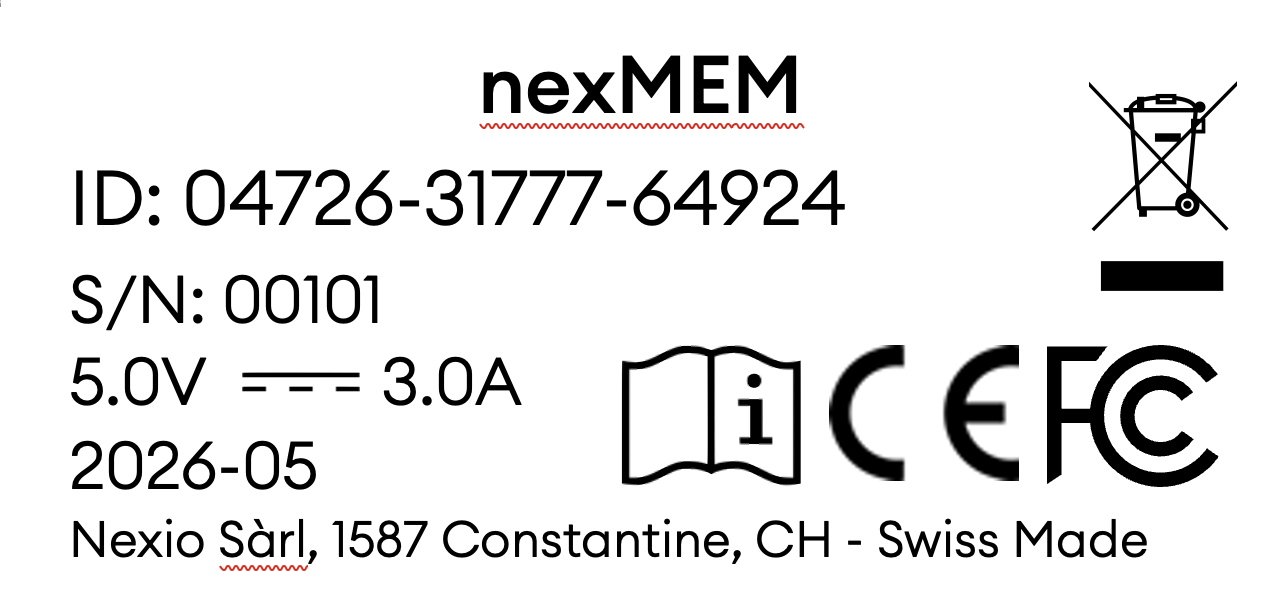
¶ 13.4 Product Label
The product label identifies the manufacturer, model, serial number, regulatory markings, and electrical rating. Do not remove or cover the product label.
¶ 14. Disposal (WEEE)
Electrical and electronic equipment must be collected separately from household waste. Follow local WEEE disposal and recycling regulations.
Contact the distributor or Nexio Sarl for take-back options.
¶ 15. Declaration of Conformity
A CE Declaration of Conformity and, where applicable, an FCC Supplier's Declaration of Conformity are available upon request from the manufacturer or distributor once the relevant conformity assessment is completed.
Tests may include, depending on the applicable market path:
- radiated emissions according to EN 55032 or FCC 47 CFR Part 15;
- radiated immunity according to EN 61000-4-3;
- electrostatic discharge immunity according to EN 61000-4-2;
- electrical safety according to IEC/EN 62368-1.
¶ Manufacturer / Contact
NEXIO Sarl
Route du Village 7
1587 Constantine
Switzerland
¶ Change History
| Version | Date | Change |
|---|---|---|
| 1.0.1 | 2026-05-11 | Initial release for nexMEM RT-6100 IFU |
| 1.1.0 | 2026-08-03 | Added complete RS-232 and XML output configuration, patient numbering, date/time behaviour, and service diagnostics |
| 1.1.1 | 2026-08-03 | Added selectable XML file history with overwrite and keep modes |
| 1.2.2 | 2026-08-07 | Added DS3231 RTC support, IANA time-zone configuration, automatic daylight-saving rules, and a collapsible canonical time-zone reference |